The case for WordPress is familiar. It powers over 40% of the web, it’s flexible, it’s open-source, you own your site. All true, all worth knowing, none of it answers the question that actually matters. Is it right for your business specifically?
WordPress is a strong default for most business websites. It’s not the right default for all of them. The wrong CMS choice locks you into months of rework, ongoing frustration and costs you didn’t see coming. The right one quietly does its job for years.
Six questions determine whether WordPress is the right fit for your business. Answer them honestly, and you’ll know where you land. If you want the broader context on what WordPress actually is and how it works, start with our complete guide to WordPress for business owners.
Question 1: What Are You Actually Trying to Build?
The starting point is the type of website you need. WordPress handles most use cases competently, but it doesn’t win at all of them.
Where WordPress is a strong choice. Standard business websites. Content-heavy sites with regular publishing. Service businesses with multiple service pages. E-commerce up to mid-volume. Membership and subscription sites. Booking-driven businesses. Most professional services. Most mid-size organisations.
Where WordPress is workable but not the obvious choice. Very high-volume e-commerce. Sites with extreme performance requirements. Heavily transactional applications. These can be built on WordPress, but the platform isn’t optimised for them and the trade-offs compound over time.
Where WordPress is the wrong choice. Tiny one-page sites you’ll never touch again. Sites where you need a specific, narrow function and a dedicated SaaS tool do it better. Anything where you want zero responsibility for maintenance.
Be honest about which category your business sits in. The mistake here is choosing WordPress because it’s familiar, or because someone you trust uses it, when the actual job calls for something else.
Question 2: Who Will Maintain It?
This is the question most businesses skip, and it’s the one that determines whether a WordPress site succeeds or falls over six months in.
WordPress is software running on your hosting. It needs ongoing care. The core software, your theme and every plugin need regular updates. Security needs monitoring. Backups need running. Performance needs checking. None of this happens by itself.
You have two realistic options.
You handle it in-house. Possible if you have a developer or a technically capable team member with the time and discipline to keep on top of it. Reality check: most businesses think they’ll do this and don’t. Updates get skipped, security drifts, eventually, something breaks.
You pay an agency or specialist provider. The most common option for serious business sites. Costs vary widely depending on the size and complexity of your site. Our Support & Maintenance service handles this for clients who’d rather not think about it.
If you’re not prepared to invest in one of these, a hosted platform like Squarespace, Wix or Shopify will give you less to think about. They handle maintenance, security and updates as part of their service. You pay for that convenience in monthly fees and reduced flexibility, but for some businesses, that’s a fair trade.
The honest question to ask yourself is this. In two years, when WordPress 7.2 needs installing, and three of your plugins are flagging compatibility warnings, who fixes that? If you don’t have an answer, WordPress isn’t your best option.
Question 3: What’s Your Budget, Honestly?
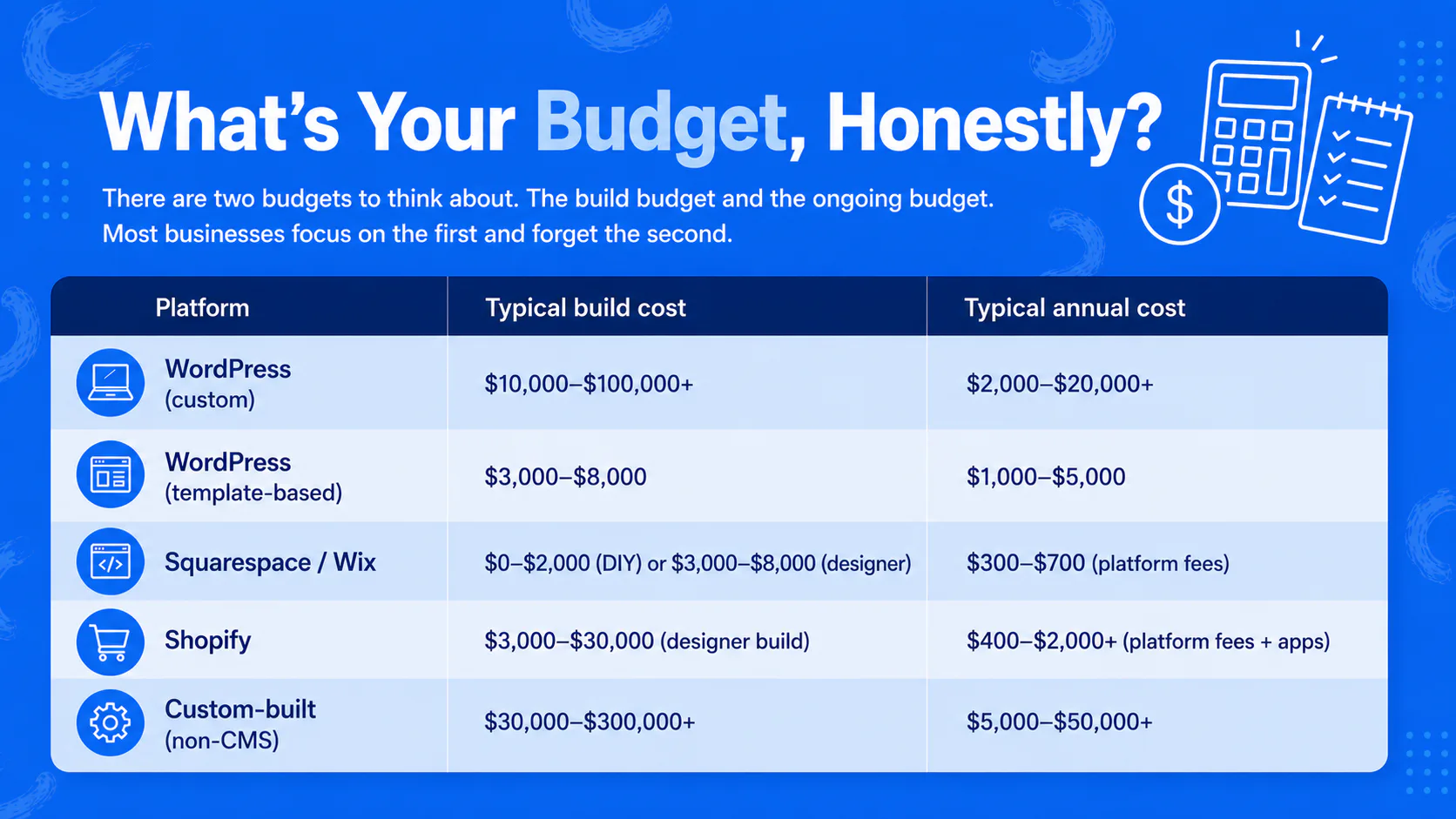
There are two budgets to think about. The build budget and the ongoing budget. Most businesses focus on the first and forget the second.
Build budget. A custom WordPress site for a serious business typically starts around $10,000 and runs into the hundreds of thousands for complex builds. A simple template-based site can be built for less, but you trade off design quality, performance and uniqueness.
Ongoing budget. Hosting, plugin licences, support, backups, security, and occasional development work. Budget between $2,000 and $20,000 a year for a business site, depending on complexity and how much support you outsource.
Here’s how that compares to the main alternatives.
| Platform | Typical build cost | Typical annual cost |
|---|---|---|
| WordPress (custom) | $10,000–$100,000+ | $2,000–$20,000+ |
| WordPress (template-based) | $3,000–$8,000 | $1,000–$5,000 |
| Squarespace / Wix | $0–$2,000 (DIY) or $3,000–$8,000 (designer) | $300–$700 (platform fees) |
| Shopify | $3,000–$30,000 (designer build) | $400–$2,000+ (platform fees + apps) |
| Custom-built (non-CMS) | $30,000–$300,000+ | $5,000–$50,000+ |
WordPress sits in the middle of this range. It’s not the cheapest option upfront, particularly compared to a DIY Squarespace site. It’s also not the most expensive, particularly compared to a fully custom build. The trade-off is flexibility. You’re paying more than a hosted builder because you own a more capable asset.
The mistake to avoid is choosing WordPress on cost grounds, building cheaply, and skimping on maintenance to keep the running costs down. That’s how you end up with a site that’s slow, insecure and unloved within eighteen months. If your budget doesn’t stretch to a properly-built and properly-maintained WordPress site, a hosted platform will give you better results for the same money.
Question 4: How Will Your Needs Change?
A website is rarely a one-and-done purchase. The business will grow. You’ll launch new services, reach new audiences, and integrate new tools. The question is whether the platform you pick can come along for the ride. The question is whether the platform you pick can come along for the ride.
WordPress’s strongest argument is its ability to adapt. The same site can start as a five-page brochure and grow into a content hub, then add e-commerce, then add a member portal, then integrate with your CRM, all without rebuilding from scratch. Plugins, themes and developers are available for almost any direction you might want to go.
That matters because the cost of switching platforms is significant. A redesign every three to five years on the same platform is normal and healthy. Changing platforms entirely is a much bigger job. Choosing a platform that can grow with you saves serious money over a five-to-ten-year horizon, even if the upfront cost is higher.
The question to ask is this. Where might this website need to go in three to five years? If the honest answer is “exactly where it is now, maybe a few more pages”, a simpler hosted platform might serve you fine. If the answer is “I’m not sure, but probably more than this”, WordPress’s flexibility is genuinely valuable.
The trap here is overestimating future needs. Not every business needs a platform that can support a member portal and a multilingual e-commerce store. Be realistic about what you’ll actually do, not what you might theoretically do.
Question 5: How Much Control Do You Need?
This is the question that separates the platforms more cleanly than any other.
You want maximum control. Choosing your own hosting, developers, and designers matters to you. You want the option to customise anything, and you want to own your data outright so you can move it whenever you want. WordPress is the right answer, along with Drupal and custom-built sites.
You want minimum hassle. Living within a platform’s constraints suits you, in exchange for not having to think about hosting, security or updates. Monthly platform fees are fine, and you don’t need deep customisation. Squarespace, Wix and Shopify are the right answers.
Most business owners overestimate how much control they need. The reality is that 80% of business websites would be served fine by a hosted platform. The 20% that genuinely need WordPress’s flexibility tend to know it because they’ve hit the wall on a hosted platform before, or because they have specific functional requirements that nothing off-the-shelf solves.
A useful test: list the three things your website must do that you’re not sure a generic hosted platform could handle. If you can’t name three, your need for WordPress’s flexibility might be lower than you think.
Question 6: Will You Have the Right People?
WordPress is only as good as the people building and running it. The platform itself is a tool. A WordPress site built badly is worse than a Squarespace site built well, by a significant margin.
The people you’ll need depend on what you’re doing.
For a custom WordPress build, you need a designer who understands WordPress’s structure, a developer who can build to it, and someone responsible for content, SEO and ongoing strategy. An agency that does all of this in-house is one option. Specialist freelancers stitched together is another. Going it alone with off-the-shelf themes and plugins is a third, but the bar for doing this well is higher than people realise.
For ongoing operations, you need someone responsible for maintenance, updates, security, backups and the occasional fix. Either a member of your team, an external support provider, or your build agency is continuing to support the site.
The risk is the cheap or careless option. A $1,500 WordPress build from someone offshore who you’ll never speak to again is not a saving. It’s a liability waiting to surface. The same is true of a build done in-house by someone who doesn’t really know WordPress.
If the people equation looks shaky, that’s a real signal. WordPress works for businesses that are prepared to work with the right people. It doesn’t work for businesses that want to cut corners on talent.
Where This Leaves You
You’ve now got six honest answers. What you’re building. Who’ll maintain it. What you can spend. How much you’ll need it to change. How much control you need. Who’s going to do the work.
If WordPress lines up against most of these, it’s likely the right choice. If it doesn’t, the platform isn’t the problem. You’ve just identified that a different tool fits your situation better, which is a valuable thing to know before you spend money in the wrong direction.
For most mid-size businesses we work with, the answers lead to WordPress. For some, they don’t, and we say so. That’s the honest version of this conversation. If you’d like a straight conversation about whether WordPress is the right fit for what you’re trying to build, we’re happy to have it.