Most email campaigns underperform for the same reasons. A messy list. No segmentation. No cadence. Sends that go out whenever someone in the team has time. The fix isn’t more sophistication. It’s getting the basics right and leaving them alone to work.
That matters because email still returns more per dollar than almost any other channel. Litmus’s 2025 State of Email survey found that 35% of marketing leaders get between $10 and $36 back for every $1 spent on email, and another 30% see between $36 and $50. The return is real, but only when the program is built properly.
What Makes an Email Campaign Work?
An email campaign works when it sends the right message to the right person at the right cadence, then gets measured properly and adjusted. The biggest wins in email almost always come from getting the basics tight, not from clever subject lines or design flourishes.
The marketing managers we work with often inherit email programs that have grown messy. Too many lists. Subscribers who haven’t opened anything in two years. Workflows that fire at the wrong moments. The reset is almost always the same. Strip it back and rebuild the parts that matter.
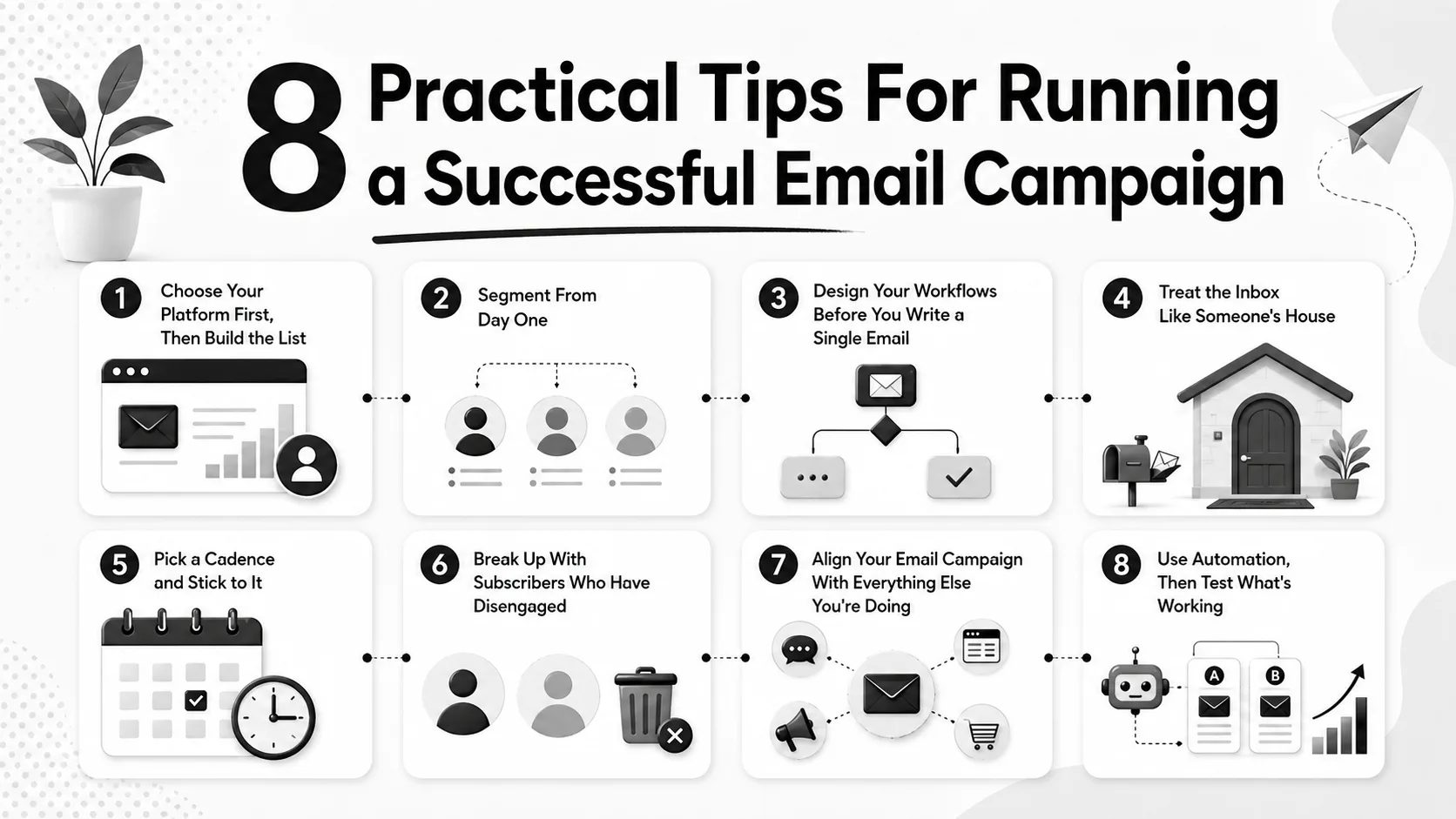
8 Practical Tips For Running a Successful Email Campaign
Below are eight practical tips for marketing managers running an email program that needs to do real work.
1. Choose Your Platform First, Then Build the List
Pick the tool you’ll use to send your campaigns before you start collecting subscribers. Sounds obvious. It often isn’t.
Marketing teams collect emails through web forms, events, downloads and customer purchases for months before anyone sets up the sending platform. Then the data has to be cleaned, deduplicated and reshaped to fit whatever tool gets picked.
Decide on Mailchimp, Klaviyo, HubSpot, Campaign Monitor, or whatever fits your stack, then design your sign-up flows around the fields and tags that tool actually uses. You’ll save yourself a migration headache.
2. Segment From Day One
Segmentation is sorting your list into groups based on what those people actually care about. Customers versus prospects. Free trial users versus paying. Subscribers in Brisbane versus Perth. New signups versus people who’ve been on the list for two years.
If you collect names in one big undifferentiated bucket, you’ll send one message to everyone and pretend it’s relevant to all of them. It won’t be. Open rates drop, unsubscribes climb, and the list erodes.
Segment your database from the moment you start collecting names. Decide what splits matter for your business, build them into the signup process, and tag people accordingly. It’s much harder to retrofit later.
3. Design Your Workflows Before You Write a Single Email
A workflow is the sequence and timing of the emails a subscriber receives. Welcome email on signup. Education email three days later. Offer an email a week after that. And so on.
Most teams write emails first, then try to figure out when to send them. This produces a calendar full of one-off blasts and a database that’s getting beaten over the head with whatever was on the mind that week. The result feels random because it is.
Map the journey first. What’s the first email a new subscriber gets? What’s the second? When does someone shift from the welcome sequence into the regular cadence? What triggers a re-engagement series? Sketch it on paper before you open the email builder. The writing gets faster once the structure is set.
4. Treat the Inbox Like Someone’s House
When someone subscribes, they’ve invited you into a personal space. Most people guard their inbox more carefully than their physical mailbox. Email is private. Promotional access to it is a privilege.
You wouldn’t walk into a customer’s house, kick the door open and start shouting about a 30% discount. Plenty of email campaigns do exactly that. All caps subject lines. Three sends a week. Aggressive countdown timers. Manipulative copy that pretends a transactional notification is something else.
Be useful. Be welcome. Be the email someone is genuinely glad to see when it lands on a Tuesday morning. That’s the bar.
5. Pick a Cadence and Stick to It
Most subscriber lists do well at one send every three to four weeks. Some programs send weekly. Some send daily. The right answer depends on your audience, your industry and what you’re offering. The wrong answer is “whenever someone in the team has time.”
Tell people up front what to expect. “Monthly newsletter, plus the occasional product update.” That’s a contract. Stick to it. If you suddenly start sending three emails a week, you’ve broken it, and the unsubscribes will tell you so.
Personalise every send. At a minimum, use the subscriber’s first name. Most platforms insert it automatically when you collect it at signup. Going further with personalised content based on segment is more work, but it’s where the engagement gains compound.
6. Break Up With Subscribers Who Have Disengaged
A clean database matters more than a big one. There’s no value in a 50,000-name list where 35,000 people haven’t opened an email in eighteen months. Those subscribers drag down your sender reputation, which hurts deliverability for everyone else on the list.
Run a re-engagement campaign for anyone who hasn’t opened in six months. A short series, three or four emails, asking if they still want to hear from you. Some will come back. The rest get removed.
The counterintuitive part is that the break-up email itself often re-engages people. When subscribers see “we’re going to stop sending unless you want us to,” some of them realise they actually do want the content, and they’ll click to stay. Win either way.
7. Align Your Email Campaign With Everything Else You’re Doing
Email shouldn’t run in a silo. If your audience is interacting with your brand offline, at an event or in store or through a service appointment, your email should reflect that. A follow-up email after an event. A thank-you after a purchase. A reminder before a renewal.
The same goes for digital touchpoints. Someone who downloads a whitepaper should enter a different workflow than someone who buys a product. Someone who attends a webinar should get a different follow-up than someone who only registered.
This kind of alignment used to require hand-cranking. It doesn’t anymore. Most modern email platforms integrate with CRMs, event tools, point-of-sale systems and analytics platforms. Set the integrations up properly once, and the right emails fire automatically. Which brings us to the next point.
8. Use Automation, Then Test What’s Working
Automation is the difference between an email program that runs itself and one that eats your week. Welcome sequences, abandoned cart flows, post-purchase nurtures, re-engagement campaigns, birthday emails, renewal reminders. All of these should be set up once and left to run.
The time you save goes into the part of the job that actually moves the numbers: testing. Subject lines, send times, copy variations, offers, calls to action, image versus text. A/B testing is the discipline of running two versions against each other and seeing which one performs better.
Review your stats often. Open rates, click rates, unsubscribe rates, conversion rates. Do more of what’s working. Stop doing what isn’t. That sounds obvious, and it’s still where most email programs fall down. The data is there, no one looks at it, and the same underperforming send goes out next month unchanged.
How Often Should You Send an Email?
Most B2B and service-business email lists do well at one send every three to four weeks. ecommerce can sustain a higher frequency, sometimes weekly or even more. The signal to watch is your unsubscribe rate. If it’s climbing each time you send, you’re sending too often, or your content isn’t earning the inbox space.
If your email program needs work, the highest-impact move is almost always cleaning the list and rebuilding your welcome sequence. Those two things compound. A cleaner list lifts deliverability across every send. A better welcome sequence sets the tone for every subscriber who joins from that point on.
Pick one to fix this month. Then the next one. You’ll be further ahead than 80% of the programs out there.
Get your email marketing sorted.