Every Google Ads campaign is built from four parts. Campaigns, ad groups, keywords and ads. Get the structure wrong, and the rest stops pulling its weight, no matter how clever the creative is. The campaign sets the goal and the budget. Ad groups organise themes. Keywords decide when an ad can show. Ads are what people see and click.
In our experience auditing accounts, the most common reason a campaign underperforms is structural, not creative. Loose keyword groupings. The wrong campaign type. Ads that don’t match the search intent. This post breaks down each component, the choices inside each one, and how they fit together, so spend lands where it earns.
How Is a Google Ads Campaign Structured?
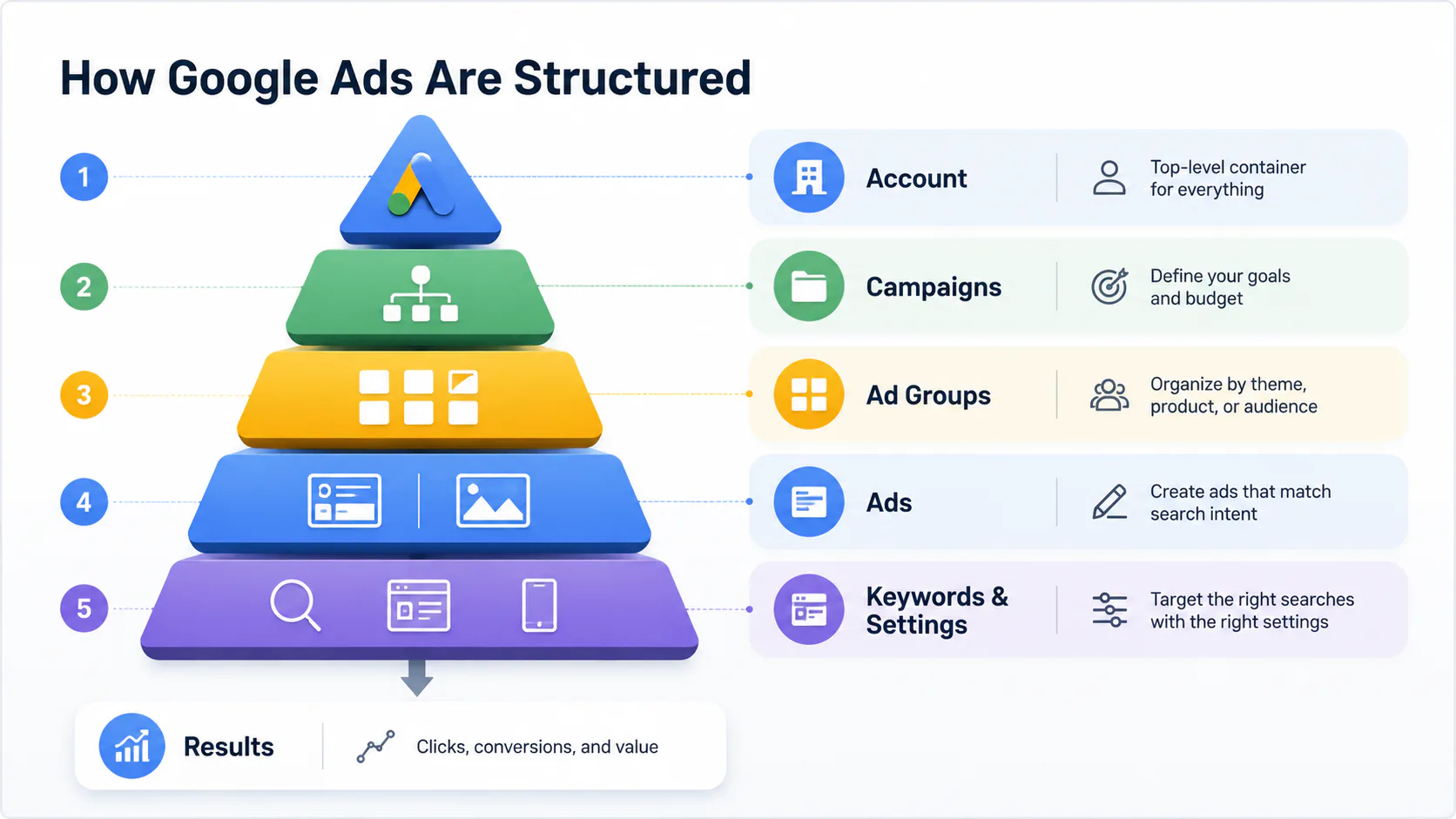
Google Ads has three nested layers. The account holds campaigns. Each campaign holds ad groups. Each ad group holds ads and, for Search and Display, keywords. Settings get more specific as you move down. Budget and goal at the campaign level. Themes at the ad group level. Match types and creative at the keyword and ad level.
Every setting at one level affects everything below it. A poorly chosen campaign type forces compromises at the ad group and keyword level. A messy keyword list weakens every ad in the group. The structure is the strategy. Most fixes worth making in an underperforming account happen here, not in the ad copy.
The Campaign Layer
The campaign is where you set the rules. Goal, type, budget, location targeting, language, bidding strategy, schedule. Everything else inherits from these decisions, so getting the campaign settings right matters more than any single creative choice.
Goal is the outcome you’re paying for. Sales, leads, website traffic, app installs, awareness, and store visits. Google uses the selected goal to recommend campaign types and bid strategies that suit it. The goal is also what you should report on. If the goal is leads, click-through rate is interesting, but conversions are what matter.
Budget is set as an average daily amount. Per Google Ads’ billing rules, daily spend can run up to twice your daily budget on high-traffic days, but monthly spend won’t exceed your daily budget multiplied by 30.4. Underspending is normal in the first weeks of a new campaign while Google’s machine learning calibrates. A budget that’s too low for the keyword competition means ads don’t show often enough to gather useful data.
Bidding strategy is how Google decides what to pay per click or conversion. Manual CPC gives you full control. Maximise Conversions, Target CPA, Target ROAS and Maximise Clicks hand control to Google’s algorithms in exchange for scale. Google’s documentation recommends a minimum of around 30 conversions in the past 30 days before Target CPA performs reliably. Below that threshold, smart bidding is guessing.
Location targeting decides where your ads can show geographically. For example, a Brisbane plumber paying for clicks from Perth is wasting money. By default, Google targets “people in or interested in” your locations, which can include searchers nowhere near your service area. Switching to “Presence: People in or regularly in your targeted locations” tightens this up. Worth doing on day one.
Why Campaign Type Matters Most
The campaign type determines where your ads can appear and what formats you can use. It also determines how much manual control you have versus how much Google automates.
| Campaign Type | Where Ads Show | Best For |
|---|---|---|
| Search | Google Search results, search partners | High-intent traffic. Someone is actively looking. |
| Display | Across the Google Display Network | Brand awareness, retargeting, visual storytelling |
| Video | YouTube and Google video partners | Awareness and consideration at scale |
| Shopping | Google Search, Shopping tab, Images | Ecommerce. Product-led with image and price |
| App | Search, Play, YouTube, Display, Discover | Driving app installs and in-app actions |
| Performance Max | All Google inventory in one campaign | Goal-focused automation across channels |
| Demand Gen | YouTube, Discover, Gmail | Reaching new audiences with rich creative |
Most businesses don’t need every type. Search and one supporting type, often Performance Max or a Display retargeting campaign, covers most practical use cases. Spreading the budget too thin across too many campaign types is a recipe for none of them having enough data to optimise.
A note on Performance Max. It’s powerful and increasingly the default Google recommends, but it gives you less visibility into where spend is going than Search does. Run it alongside a well-structured Search campaign rather than as a replacement, especially if you sell something with clear keyword intent.
Ad Groups and How to Organise Them
An ad group is a container for ads and keywords (or audiences) that share a single theme. The discipline is a tight grouping. Each ad group should target one product, one service or one tightly related set of search intents.
Loose ad groups are the most common structural problem we see. A single ad group containing keywords for “web design”, “logo design”, and “SEO” forces every ad in that group to be generic enough to cover all three. Generic ads convert worse than specific ones. The fix is to split into three ad groups, each with its own ads written to match the specific intent.
A useful rule of thumb. If you can’t write an ad headline that speaks directly to every keyword in the ad group, the ad group is too broad. Split it.
Keywords and Match Types
Keywords are the words and phrases that trigger Search and Shopping ads. They’re the bridge between what someone types into Google and what your ad says back. Keyword choice and match type together decide whether you’re paying for relevant traffic or not.
Match types control how closely a search has to match your keyword.
| Match Type | How It Works | Trade-off |
|---|---|---|
| Broad | Triggers on related searches, synonyms, misspellings, related concepts | Maximum reach. Lowest control. Easy to waste spend without negatives. |
| Phrase | Triggers when the search includes the meaning of your keyphrase | Balance of reach and relevance |
| Exact | Triggers when the search closely matches the keyword’s meaning | Highest relevance. Lowest reach. |
Broad match has shifted significantly over the past few years. It now relies on Google’s machine learning to interpret intent, which makes it more useful with smart bidding than it used to be, and more dangerous without negative keywords. Many accounts running broad match without strong negative lists are paying for searches that have nothing to do with the business.
Negative keywords are the other side of the coin. They prevent ads from showing for searches you don’t want. Adding negatives weekly is one of the highest-return activities in any Search campaign. Common patterns to block include “free”, “DIY”, “jobs”, competitor names you don’t want to appear next to, and irrelevant locations or product variants.
For Display campaigns, keywords work differently. They’re contextual signals telling Google what kind of content your ad should appear next to, not search triggers. The principle stays the same. Tight, relevant keyword sets outperform loose ones.
The Ads Themselves
The ad is what the user sees. The format depends on campaign type, but every ad does the same job. Match the search intent, promise something specific, and give the user a reason to click rather than scroll past.
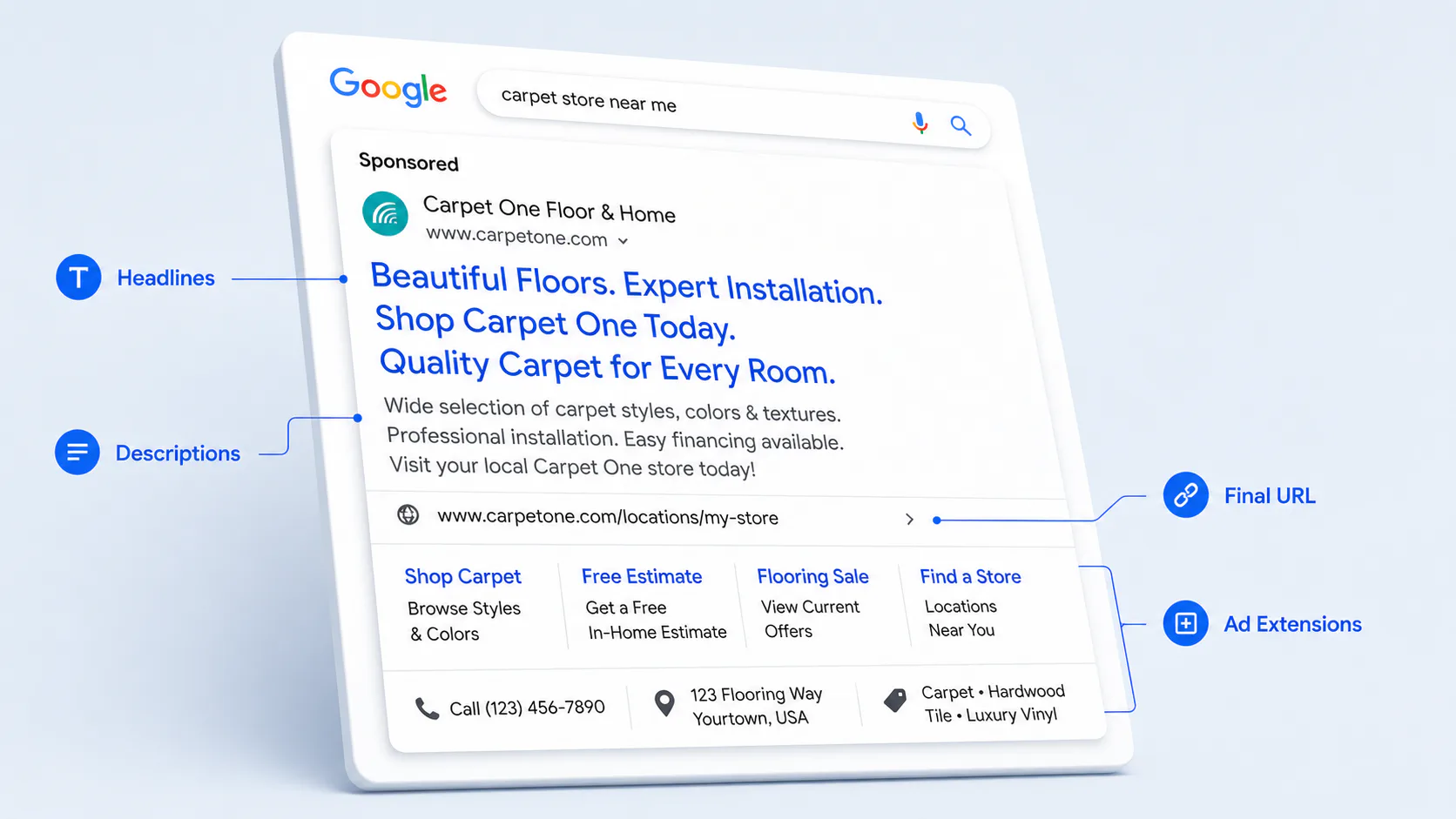
For Search ads, the elements are headlines, descriptions, a final URL and ad extensions.
- Headlines. Up to 15 short headlines per Responsive Search Ad, each 30 characters or fewer. Google rotates and combines them. Write each one so any combination still makes sense.
- Descriptions. Up to four longer text blocks, 90 characters each. Used to expand on the offer, address objections, and prompt action.
- Final URL. The page the user lands on. The match between ad and landing page matters as much as the ad itself.
- Ad extensions. Sitelinks, callouts, structured snippets, call extensions, location extensions, and lead form extensions. They expand the ad’s footprint on the page and give users more reasons to engage.
For Display, Video, App, Demand Gen and Performance Max, ads also include image and video assets. The principle stays the same. The ad is a promise. The landing page has to keep it.
Putting the Pieces Together
The four components function effectively only when they align properly. When a high-intent keyword directs traffic to a generic homepage, it results in wasted clicks. Similarly, if a specific ad is matched to a vague search, it leads to wasted impressions. Additionally, a narrow ad group operating under the wrong campaign type can undermine the overall structure.
A working Google Ads campaign looks like this. The campaign type matches the goal. The budget is enough to gather data, given the keyword competition. Ad groups are tight, each one focused on a single intent. Keywords match what real customers type. Negative keywords prune the noise. Ads speak directly to the search query. The landing page delivers what the ad promised. Conversion tracking is set up so you actually know what’s working.
When all of that is in place, the campaign is fixable. You can read the data and improve. When any of it is missing, the data is misleading, and the optimisation is guesswork.
Common Mistakes That Waste Spend
A few patterns show up again and again in audits.
- Running a broad match without a serious negative keyword list
- One ad group covering too many themes, with one generic ad trying to serve all of them
- No conversion tracking, so optimisation is based on clicks instead of outcomes
- Sending paid traffic to the homepage instead of a focused landing page
- Choosing Performance Max for everything because Google recommends it, with no visibility into what’s actually working
- Setting daily budgets too low for the keyword competition, so the campaign never gathers enough data to optimise
- Ignoring the default location targeting setting
These are fixable. They’re all visible in the account inside the first hour of a proper audit. If your account has been running for a while and the numbers don’t add up to what you’re spending, structure is usually where the answer lives.
Need Eyes on Your Google Ads Account?
Setting up Google Ads is a different job from running it well over time. The components are simple. The decisions inside each one compound. Account audits and ongoing management are part of what we do. If something in here looked familiar, talk to us.