WordPress is a content management system that lets you build and run a website without writing code. It powers around 43% of all websites online, from small business sites to major publications, and it has been the dominant CMS for well over a decade.
For business owners, the appeal is practical. You can publish content, update prices, swap photos and add new pages without calling a developer every time. You own the site, you choose where it lives, and you can make it do almost anything if you’re willing to invest in the right people.
That said, WordPress is not the right fit for every business. It rewards owners who are prepared to maintain it. Left alone, it can become a liability. Whether it belongs in your business depends on what you’re trying to do, what you’re willing to maintain, and what the alternatives offer. Worth understanding properly before you commit.
What Is WordPress?
WordPress is open-source software that runs websites. It works by giving you a dashboard where you create pages, posts and media, and a public-facing site that displays all of it to your visitors. The software is free to download and use, and the project is maintained by a global community of contributors and overseen by the WordPress Foundation.
It started in 2003 as a blogging tool built by Matt Mullenweg and Mike Little. Over the next two decades, it grew into a general-purpose platform that runs business websites, e-commerce stores, membership sites, news publications, portfolios and government services. According to W3Techs, WordPress powers 41.9% of all websites on the internet and holds 59.5% of the CMS market as of May 2026.
WordPress.org vs WordPress.com
This trips people up constantly, so let’s get it straight.
WordPress.org is the self-hosted version. You download the software, install it on the hosting you control, and you can do anything you want with it. Every plugin, every theme, every customisation is on the table. This is what most people mean when they say “WordPress”, and it’s what businesses generally use.
WordPress.com is a hosted service run by a company called Automattic. It uses the same underlying software but with restrictions on what you can install and customise unless you pay for higher-tier plans. It’s closer to Wix or Squarespace in how it operates.
For the rest of this guide, “WordPress” means the self-hosted .org version. If you’re building a business site, that’s almost always the one you want.
What Is a CMS, and Why Does That Matter?
A content management system is software that separates the content of your website from the code that displays it. It works by storing your pages, posts, images and other content in a database, then assembling them into a live website using a theme that controls how everything looks.
Before CMS platforms existed, updating a website meant editing HTML and CSS files by hand and uploading them to a server. A small change to your contact details could mean half an hour of work and a call to a developer.
A CMS changes that. You log in, find the page you want to update, type the new text into a box and click save. The visitor sees the change immediately. No code, no developer, no waiting.
That shift matters more than it sounds. It means the people who know your business best can keep your website current without being held up by the people who built it. Your marketing team can publish a new case study. Your office manager can update opening hours. And your sales lead can add a new service page when one comes online. The site stops being a frozen brochure and starts being a working part of the business.
WordPress is the most widely used CMS, but it’s not the only one. Drupal, Joomla, Shopify and a handful of others all compete in the space. We’ll cover how they compare later in the guide.
What You Can Build With WordPress
WordPress has matured into a platform that supports several distinct types of websites, each with its own ecosystem of themes, plugins and conventions. The most common use cases for business owners are these.
Business and brochure sites. The standard small-to-mid business website. Home, About, Services, Work, Contact. Maybe a blog. This is WordPress’s bread and butter and the configuration most agencies will recommend for it.
E-commerce stores. WooCommerce, a free plugin owned by the same company behind WordPress.com, turns a WordPress site into an online store. It handles products, payments, shipping, tax and inventory. It powers a significant portion of the world’s e-commerce sites and competes directly with Shopify. For a full breakdown, see our article on WooCommerce vs Shopify.
Membership and subscription sites. Plugins like MemberPress or Restrict Content Pro let you put content behind a paywall, run recurring subscriptions and manage member access. Useful for course creators, professional associations and content businesses.
News and publishing sites. WordPress’s roots are in publishing, and it remains one of the strongest platforms for content-heavy sites. Editorial workflows, multiple author roles, scheduled publishing and category management are all built in.
Booking and service sites. Plugins handle appointments, bookings, reservations and quotes. Health practices, salons, trades and accommodation businesses all run effectively on WordPress.
Portfolios and creative sites. Visual-first sites for designers, photographers, architects and agencies. Thousands of themes cater specifically to this use case.
Intranets and private platforms. Less common but viable. WordPress can sit behind a login wall and run as an internal company site, a partner portal or a knowledge base.
The point isn’t that WordPress is the best choice for every one of these. For a high-volume e-commerce operation, Shopify might serve you better. For a simple booking site with no other moving parts, a dedicated tool might be quicker to set up. But across the full range of website types a business might need, WordPress is one of the few platforms that can handle all of them competently.
How WordPress Actually Works
Under the bonnet, WordPress is three things working together. The core software, your theme, and your plugins.
The core software
The WordPress core is the engine. It handles user accounts, page and post management, the database, the editor, the media library and the public-facing site. Updates are released regularly, both for security patches and for new features. Major versions land roughly twice a year.
You can’t directly edit the core, and you shouldn’t want to. Every customisation happens through themes and plugins, which is how WordPress stays updatable without breaking your site.
Themes
A theme controls how your site looks. It defines the layout, typography, colours and styling. You can buy themes from marketplaces like ThemeForest, get free ones from the WordPress repository, or have one built custom for your business.
Off-the-shelf themes are quick and cheap but come with trade-offs. They’re built for a generic audience, so they often include features you don’t need, performance overhead you don’t want, and design decisions that don’t quite match your brand. Custom themes cost more upfront but give you a site that does exactly what your business needs without the bloat. Most serious business sites end up on custom or heavily customised themes for this reason.
Plugins
A plugin adds functionality. Want a contact form? There’s a plugin. Want to take payments? Plugin. Want SEO controls, backups, image optimisation, security hardening, analytics, e-commerce, and multilingual support? All plugins.
The WordPress plugin directory hosts over 60,000 free plugins, and the commercial marketplace adds tens of thousands more. This is where WordPress gets its reputation for flexibility. Almost any feature you can think of has been built by someone already.
It’s also where it gets its reputation for fragility. Plugins are written by different developers to different standards. Cheap or poorly maintained plugins introduce security holes, slow your site down, and conflict with each other. Plugin sprawl is one of the most common reasons WordPress sites end up in trouble.
The editors
WordPress gives you three ways to edit content.
The Block Editor is the default. Introduced in WordPress 5.0, it builds pages out of individual blocks, each one a paragraph, heading, image, gallery or other element. You add blocks, configure them in a sidebar, and stack them into pages.
The Classic Editor is the older, word-processor-style editor. It’s still maintained as an official plugin, and many businesses prefer it for its simplicity. If your team finds the Block Editor frustrating, switching to Classic is a one-plugin job.
Page builders are third-party plugins that replace either editor with a drag-and-drop interface. Elementor, Beaver Builder and Divi are the most common. They give you fine visual control without writing code, but they add weight to your site and lock you into the builder’s structure. Use them where they’re useful, don’t use them where they aren’t.
What WordPress Costs to Run
WordPress itself is free. The site you build with it isn’t. Here’s where the money actually goes.
Domain name. Around $15 to $30 a year, paid to a registrar. Non-negotiable.
Hosting. This is where you pay to keep your site online. Entry-level shared hosting starts around $10 a month and is fine for a small site with low traffic. Managed WordPress hosting starts around $30 to $50 a month and includes better performance, automatic backups, security hardening and support. Higher-traffic or business-critical sites typically sit on managed hosting in the $100 to $500 a month range. Enterprise hosting can run into the thousands.
Theme. A premium theme from a marketplace costs $50 to $100 as a one-off. A custom theme built by an agency starts in the low thousands and scales from there depending on complexity.
Plugins. Many essential plugins are free. Premium plugins typically run on annual licences from $50 to a few hundred dollars each. A standard business site might use five to fifteen plugins, some free, some paid.
Development. If you’re building anything beyond a basic site, you’ll work with developers. Hourly rates vary wildly, from $50 an hour for offshore work to $200 plus for senior in-house developers at established agencies. Project budgets for a custom WordPress site typically start around $10,000 and can run into the hundreds of thousands for complex builds.
Ongoing support and maintenance. WordPress sites need regular updates, security monitoring, backups and the occasional fix. Some businesses handle this in-house. Most outsource it to their agency or a dedicated support provider. Expect to spend between $100 and $1,500 a month, depending on the size and complexity of your site. Our Support & Maintenance service handles this for clients who’d rather not.
The total cost depends heavily on what you’re building. A simple site might cost a few thousand dollars to set up and a few hundred dollars a year to run. A serious business site with custom design, e-commerce and integrations is a five-to-six-figure investment. The honest answer to “what does a WordPress site cost” is “what does any custom-built business asset cost”, and the range is just as wide.
Why Business Owners Choose WordPress
Setting aside the marketing copy, here are the real reasons businesses pick WordPress.
You own everything. Your site, your content, your data. If you decide your hosting provider is slow or expensive, you move the site. If you decide your agency isn’t working out, you change agencies. Nothing about WordPress locks you into a single supplier, and that matters more over a five-to-ten-year horizon than it does on day one.
It can do what you need now and what you’ll need later. Most businesses underestimate how much their website will need to change. New services, new audiences, new integrations, new ways of selling. WordPress’s plugin and theme ecosystem means you can almost always add what you need without rebuilding from scratch.
It’s easy to find people who can work on it. WordPress’s market share is also its talent pool. You’re not hunting for a specialist who happens to know your obscure platform. Almost any developer or agency can pick up a WordPress site and get to work.
Your team can run it. A well-built WordPress site lets non-technical staff publish content, update pages, and run the basics without help. That’s the original promise of a CMS, and WordPress delivers it as well as anything in the market.
It’s good for SEO out of the box. Clean URL structures, proper heading hierarchy, fast loading when configured well, and a strong ecosystem of SEO plugins. WordPress isn’t magic for search rankings, but it gives you the right foundations.
The community is huge. Documentation, tutorials, forums, training, conferences. If your team needs to learn something, the resources exist. If your developer needs to solve a problem, someone has solved it before.
Where WordPress Isn’t the Right Choice
This is the section most “why use WordPress” articles skip. We won’t.
WordPress is a strong default, not a universal one. Here’s where it isn’t the right answer.
Your site is genuinely tiny, and you don’t want to think about it. If you need a one-page site for a small operation, you’ll publish it once, you’ll update it twice a year, and you don’t want to manage hosting, updates or security, a hosted builder like Squarespace or Wix will give you less to worry about. WordPress rewards investment. If you’re not going to invest, it’s the wrong tool.
You need a very specific, narrow function. If your business is a booking system, a directory, a job board, or any other tightly-defined application, a dedicated SaaS platform built for that one job will often beat a WordPress site built to do the same thing.
You’re allergic to maintenance. This is the big one. WordPress is software that runs on your hosting, and software needs to be maintained. Plugins need updating, the core needs updating, security needs monitoring, and backups need running. Skip this, and your site eventually breaks, gets hacked, or both. We cover the security side in detail in How to Secure Your WordPress Website. If you have neither the time, the team, nor the budget to keep a WordPress site maintained, choose something that does the maintenance for you.
The honest position is this. WordPress is excellent for most business websites, but “most” isn’t “all”. The right answer depends on what you’re trying to do and what you’re prepared to put into running it.
What You Need to Run a WordPress Site Well
A WordPress site is a working asset, not a finished product. Treating it like a brochure that you build once and forget is how most WordPress sites end up broken, slow or compromised. Here’s the baseline for keeping one healthy.
Reliable hosting. Cheap shared hosting is fine for small sites with low traffic. Anything serious belongs on managed WordPress hosting or a properly-configured VPS. The cost difference is real, but so is the difference in speed, uptime and security.
Regular updates. The WordPress core, your theme and plugins need updating regularly. Some updates are minor; some patch active security vulnerabilities. Skipping updates is the single most common cause of hacked WordPress sites. Updates should be tested on a staging site before going live, especially on business-critical sites.
Automated backups. Daily or weekly, depending on how much your content changes. Stored off-site, not just on the same server as your live site. A backup you’ve never tested isn’t a backup. Restore one occasionally to make sure it actually works.
Security hardening. Strong passwords, two-factor authentication, a reputable security plugin, regular malware scanning, and a Web Application Firewall in front of the site. WordPress is targeted constantly because of its market share. The defences need to be on by default.
Performance monitoring. A slow site costs you traffic, conversions and search rankings. Page speed should be measured regularly and addressed when it slips. Image compression, caching and code optimisation are the usual culprits when speed drops.
A maintenance plan or partner. Most business owners don’t want to think about any of the above. The practical answer is to outsource it. Either a dedicated support plan with your agency or a specialist WordPress maintenance provider. Either way, the work needs to be happening, and it needs to be someone’s job.
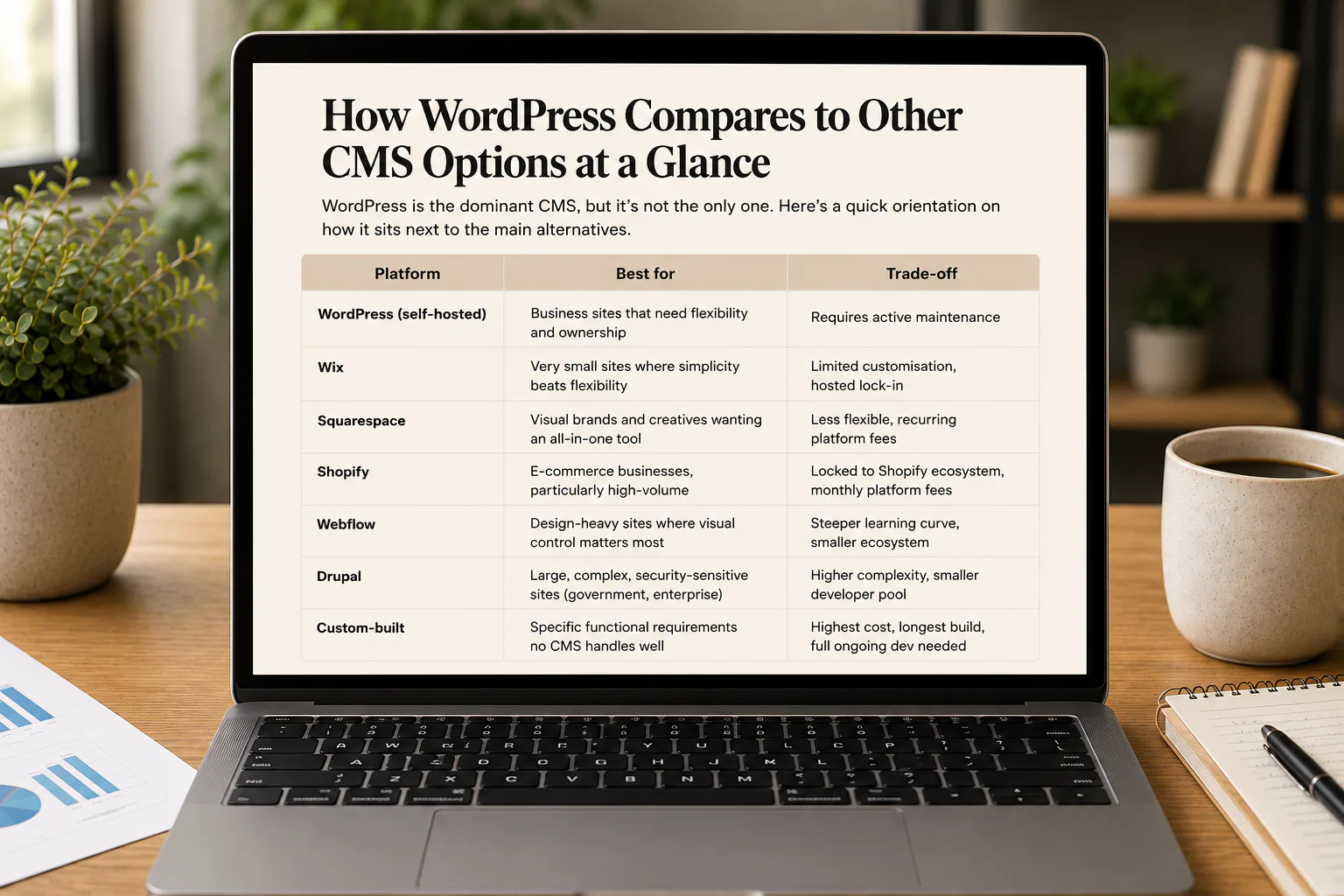
How WordPress Compares to Other CMS Options at a Glance
WordPress is the dominant CMS, but it’s not the only one. Here’s a quick orientation on how it sits next to the main alternatives.
| Platform | Best for | Trade-off |
|---|---|---|
| WordPress (self-hosted) | Business sites that need flexibility and ownership | Requires active maintenance |
| Wix | Very small sites where simplicity beats flexibility | Limited customisation, hosted lock-in |
| Squarespace | Visual brands and creatives wanting an all-in-one tool | Less flexible, recurring platform fees |
| Shopify | E-commerce businesses, particularly high-volume | Locked to Shopify ecosystem, monthly platform fees |
| Webflow | Design-heavy sites where visual control matters most | Steeper learning curve, smaller ecosystem |
| Drupal | Large, complex, security-sensitive sites (government, enterprise) | Higher complexity, smaller developer pool |
| Custom-built | Specific functional requirements no CMS handles well | Highest cost, longest build, full ongoing dev needed |
The trade-off pattern is consistent. Hosted platforms (Wix, Squarespace, Shopify) buy you simplicity and remove maintenance, but cap what you can do and tie you to their ecosystem. Self-hosted platforms (WordPress, Drupal) give you control and flexibility, but require you to manage them. Custom builds give you exactly what you want, but at the cost and complexity of building it from scratch.
For most mid-size business websites, WordPress sits in the right part of that trade-off. Enough flexibility to grow, enough community support to stay current, and enough talent in the market to keep options open. For an exploration of the broader platform landscape, see Website Platforms for Businesses.
Is WordPress Right For You?
WordPress is the right answer for a lot of business websites, but it’s not the right answer for all of them. And even when it is, it only works if it’s built and maintained properly.
If you’re weighing up whether WordPress is the right platform for your business, or you’ve got an existing site that needs to be rebuilt, improved or kept in better shape, we can help. Mettro has been building business websites for over 25 years and working with WordPress since the early days of the platform. We’ve seen most of what can go right and wrong with it.
Talk to us about your website.