Your Google Business Profile is one of the main signals Google that feeds local SEO, and most businesses set it up once and forget it. That’s the problem. A profile that’s sat untouched for two years is often part of the reason competitors are showing up above you on Google Maps.
If you want to be found by people searching for what you do in your area, the profile needs to be active, accurate and complete. Fixing it doesn’t take long, and the work tends to pay back quickly.
What Is Local SEO?
Local SEO is the practice of improving how your business ranks in location-based search results. It works by giving search engines clearer signals about where you operate, what you offer, and how trusted you are by nearby customers, so your business appears in Google Maps, the local pack, and AI-generated answers for nearby services.
It’s a different game from general SEO. National rankings tend to reward authority and content depth. Local rankings tend to reward proximity, accuracy and engagement.
What Is a Google Business Profile?
Google Business Profile is a free tool from Google that lets you manage how your business appears across Google Search and Google Maps. It works by pulling together your business name, address, hours, photos, reviews, services and posts into a single listing that Google uses to decide who sees you and where.
It was previously called Google My Business. The name changed in 2021, but the function is the same. If you’ve heard either term, they refer to the same thing.
A complete, well-maintained profile gives Google two things. A clearer picture of what you do, and more reasons to show you to people nearby.
Why Google Business Profile Matters for Local SEO
When someone searches for a service near them, the first results are often Google Business Profiles.
The boxed group of three businesses at the top of the page, with the map and pins, is called the local pack. Below it are local listings, the organic results showing business name, location, reviews and contact details. Both pull data directly from Google Business Profiles.
If your profile is thin, outdated or inconsistent, it becomes harder to appear in either. That’s the cost of ignoring it.
What a Strong Profile Does for Your Business
A well-optimised profile works in five ways.
- Improves local visibility. Your business has a better chance of showing up in the local pack and local listings when people search for what you offer nearby.
- Builds credibility. Reviews, recent photos and complete information make your business look active and trustworthy. People are more likely to click a listing that looks alive.
- Showcases what you offer. You can list products, services, opening hours, and add photos and videos directly to the profile.
- Improves engagement. You can respond to reviews, answer questions and post updates. Each of these signals to Google that you’re active.
- Drives action. Click-to-call, directions and website links sit on the profile itself, so people can contact you without leaving the search page.
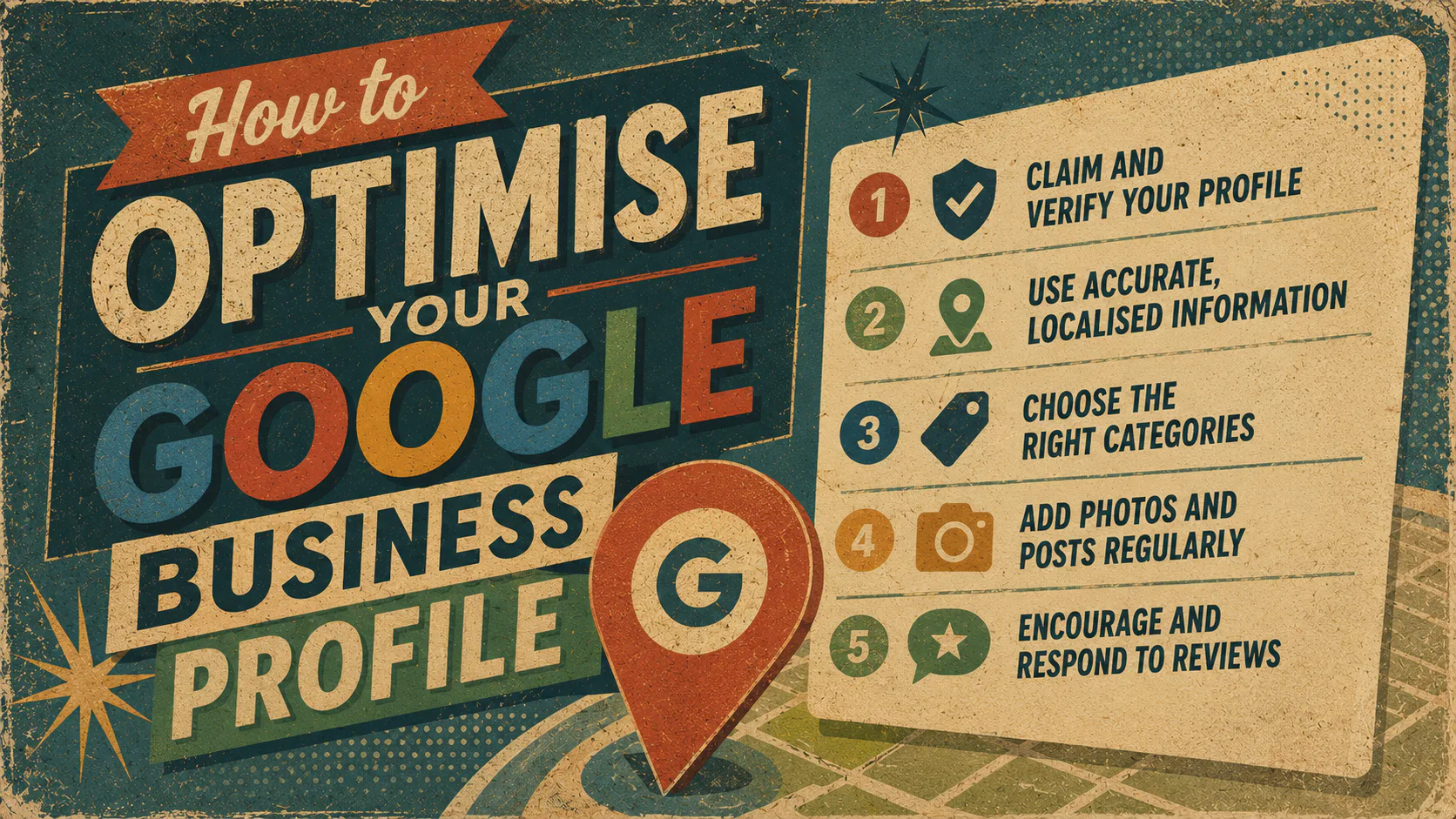
How to Optimise Your Google Business Profile
Here are the things you can do to optimise your profile.
1. Claim and Verify Your Profile
Until you verify ownership, you can’t edit the listing or respond to reviews. Google verifies businesses by postcard, phone, email or video call, depending on the business type.
If a profile already exists for your business, claim it instead of creating a new one. Duplicate listings split your reviews and confuse Google.
2. Use Accurate, Localised Information
Your business name, address, phone number and website (your NAP plus website) should match across your Google profile, your website and every other directory you appear in.
Inconsistencies can weaken the signal Google uses to identify your business. “Pty Ltd” on one site and “P/L” on another counts as a mismatch. So does an old phone number sitting on a forgotten directory listing.
3. Choose the Right Categories
Your primary category is one of the stronger signals Google uses to match you with searches. Choose the most specific one that accurately describes your core offer.
If you’re a Mexican restaurant, “Mexican restaurant” is more useful than “restaurant”. If you’re a commercial electrician, that’s more useful than “electrician”.
Add secondary categories for additional services, but don’t pad the list. A category you don’t actually deliver against can confuse Google rather than help it.
4. Add Photos and Posts Regularly
Profiles with recent photos and posts tend to see more engagement, and activity is one of the signals Google considers.
Aim to add new photos every month. Use Google Posts to share updates, offers, events or news. Treat the profile like a low-effort social channel, because that’s effectively what it is.
5. Encourage and Respond to Reviews
Reviews work as both a trust signal and a ranking signal. Volume, recency and rating all play a role, and replying is part of the picture too.
What Else Helps Your Local SEO
Beyond keeping your Google Business Profile up to date, there are several other practical steps you can take to strengthen your local SEO and build trust with nearby customers.
Ask happy customers for a review. Make it easy by sending them your direct review link. Respond to every review you receive, including the difficult ones, in a calm and professional tone. Future customers tend to read those replies more carefully than the reviews themselves.
Submit your business to trusted Australian directories like True Local and Yellow Pages, along with industry-specific platforms relevant to your sector. Each consistent listing strengthens your NAP signal across the web.
Social media plays a role, too. Tag your location, share local content, and interact with nearby accounts and businesses. It’s part of the broader picture Google reads when working out who you are and where you operate.
Your review link should be everywhere people might want to use it. Drop it into email signatures, invoices, follow-up messages and social bios. The easier you make leaving a review, the more you’re likely to receive.
Local content on your website does the same job from a different angle. Service-area pages, location-specific blog posts and FAQs that mention your suburb or city give Google more local context to work with.
Common Mistakes That Hurt Local SEO
You can do everything above and still lose ground if these slip in.
Inconsistent business information. NAP inconsistency is a common contributor to stalled local rankings. Audit every directory, social profile and citation. Make them match.
Vague or wrong categories. Choosing “shop” when you’re a florist makes it harder for Google to match you with the right searches. Specificity helps.
Keyword stuffing in the description. Cramming your business description with keywords reads as spam and may get flagged by Google. Write the description the way you’d describe your business to a customer standing in front of you.
Outdated or missing information. Wrong opening hours, broken website links, last year’s holiday closure still showing. Each of these can cost trust and signal neglect. Set a calendar reminder to check the profile monthly.
No photos or poor-quality images. Profiles with no photos, blurry photos or stock-photo blandness often get fewer clicks. Add clear images of your space, products, team and work. A real photo of your shopfront tends to land better than a generic stock image.
How Often Should You Update Your Profile?
Monthly at a minimum. Hours, services and contact details are worth reviewing every month. Aim to add new photos and at least one Google Post in that same window.
Quarterly, take a longer look. Check that your categories still reflect what you sell, review your description, and audit your NAP across other directories. Consistent activity over time tends to outperform big one-off pushes.
Optimising your Google Business Profile is one piece of a bigger picture. If you want to show up in search, drive qualified traffic to your website and turn that traffic into leads, our SEO services cover the full stack.
Talk to us about your SEO Strategy.